

Connector lines in the flow editor are now fully interactive. Click a line to select it (highlighted in orange), shift-click or cmd-click for multi-select, or drag-select an area to catch several at once. Selected lines can be deleted with Delete or Backspace without affecting the operators they connect.


Grab any connector line and drag it to a different operator to change where it points. Drag to empty canvas to remove the connection. When multiple lines are selected, dragging one reconnects or deletes all of them. If the new target is invalid (self-link or duplicate), the original links are restored.
Connect multiple operators in a single drag. Select the target operators first, then drag from the source and all of them get wired up at once. Or select several source operators and drag from one to connect them all to the same target. Preview lines show exactly what will be created before you release.
Long creative names no longer push action buttons off-screen. The name truncates with an ellipsis and shows the full name on hover.
The builder preview now snaps back to center with a smooth animation instead of jumping instantly, and waits a moment before repositioning so it doesn't interrupt your work.
The formats column in list tables now always shows a "+N more" button when there are extra formats, and long names truncate with ellipsis instead of overflowing.
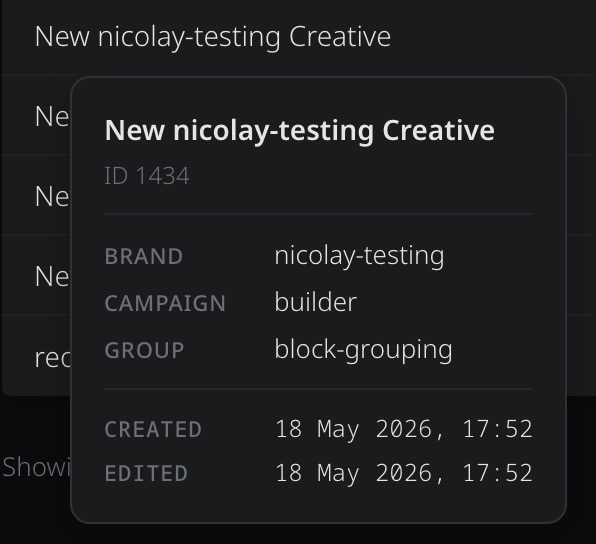
Tooltips across all list pages (creatives, campaigns, creative groups, enterprises, workspaces) have a new structured layout with a name header, context section, and monospace-formatted dates.
The flow editor grid was invisible in dark themes because of how the SVG pattern was drawn. It now uses a CSS gradient with a theme-aware token, so the grid is subtle but visible in all themes.
Paint-roll and animation hover states on flow operators now use theme-aware tokens so they render correctly in dark themes.
Connector lines now attach to the exact position of the visible connector dot instead of guessing from the operator's bounding box. Lines also update correctly after switching tabs or when operators with dynamic content (like Click Target and Library Script) finish loading.
Operators with dynamic content no longer drift away from their saved position when the page loads. The layout now waits for content to settle before adjusting positions.