← All releases

Creative Engine 6.20.0

September 16, 2026

Full changelog on GitHub →
Live preview while adjusting values

The creative now updates in real time as you drag to adjust values in the builder, without rebuilding.

When you drag a number input in the builder, the change is applied directly to the running creative so you can see the effect instantly. This works for all block types, including blocks inside groups and video control properties.

Scrubbing font size with live preview in the engine
Video controls configuration

The engine now supports visibility, size, color, and directional offset for video player controls.

Video controls can now be shown or hidden, sized, colored (with opacity), and offset in any direction from their corner position. These properties respond to live preview updates from the builder. Legacy creatives without the new properties continue to work as before.
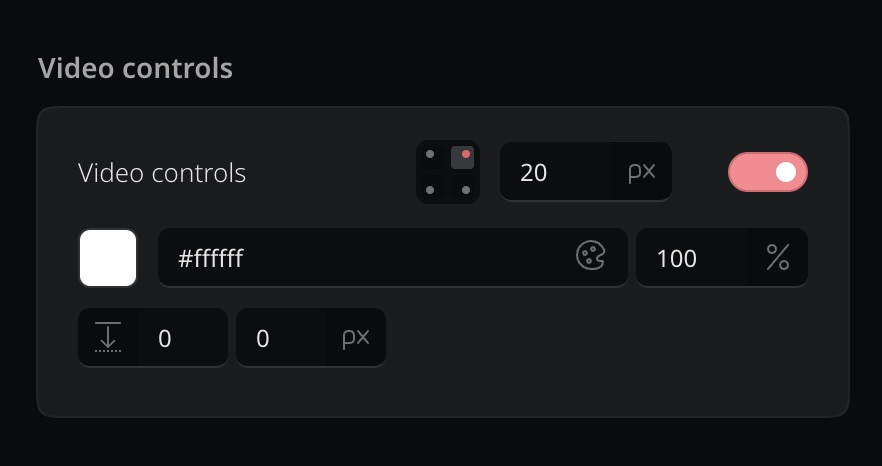
The new video controls configuration card in the builder
Clickable backgrounds work inside groups

Creatives using grouped blocks now correctly respond to background click links.

Previously, when blocks were organized into groups, the group container could intercept clicks and prevent the background clickthrough from working.

Now, clicks on empty areas inside a group pass through to the background as expected. Text and graphic blocks also let clicks pass through unless they have their own clickthrough link.

Fixes

Live preview now works for blocks inside groups, video autoplay works in standalone preview, and a crash on empty flow steps has been fixed.

Reactive preview updates (from drag-to-adjust) now correctly propagate to blocks that are inside groups, including passing through the controls position to video blocks. Video autoplay has been fixed in the standalone preview mode. A crash that could occur when a flow step had no content blocks has also been resolved.